

Right now my Mac has 13 linked Git worktrees under ~/Work. Coding agents made most of them, one per task, and 11.6 GB sit in a single repository.
Agents are good at making worktrees and bad at cleaning them up. residue-cli does the cleanup: it removes a worktree only when nothing in it would be lost, whichever agent left it.
I wrote about why I built it three days ago. This is what it looks like to use today, how it decides what to remove, and the Mac app, residue-ui.
One command installs it, and on macOS and Linux it also turns on automatic cleanup:
curl -fsSL https://residue.whiteheap.com/install.sh | shHomebrew alone installs the residue command without the service:
brew install whiteheap/tap/residueHere’s residue scan ~/Work on my Mac, trimmed to three of the repositories that have worktrees:
$ residue scan ~/Workresidue 0.0.11 · as of 15:08:54 +02:00 · activity: lsof inspected 475 of 732 running processes
Work/0xinsider · 5 linked worktrees · 11.6 GB keep 2.1 GB Work/0xinsider/.worktrees/33726-agent-login-claude-code-ux [feat/agent-login-claude-code-ux] in use: bash[73041], perl[74009], perl[74022] (+3 more) · ignored: .cargo/ (1 file, 667 B), .local-dev/ (2 files, 0 B) keep 2.1 GB Work/0xinsider/.local-dev/lane-build/slot-1 [lane-build/slot-1] locked: merge-lane build slot, owned by tools/run lane-build (#26273) · ignored: .cargo/ (1 file, 249 B), .local-dev/ (1 file, 0 B) (+1 more; 3 entries hold 4 files, 3.4 MB)
Work/docs.0xinsider.com · 3 linked worktrees · 5.1 MB keep 2.2 MB Work/docs-entitlement-diagnostics-16235 [docs/entitlement-diagnostics-16235] 1 change
Work/residue · 3 linked worktrees · 19.4 MB candidate 12.9 MB Work/residue-wt/launch-code [fix/launch-hardening] branch kept · all commits on a remote · changed 2 minutes ago keep 3.3 MB Work/residue-wt/readme [docs/readme-from-site] 1 change · 1 untracked candidate 3.2 MB Work/residue-wt/probe-bytes [fix/probe-path-bytes] branch kept · all commits on a remote · changed 5 minutes ago
disk 475 GB free of 995 GB (48%), 339.0M of 346.3M inodes free (filesystem of Work/0xinsider)2 candidates of 13 linked worktrees · 16.2 MB allocated · about 16.2 MB reclaimableOnly 2 of the 13 can go, and that’s the point. A worktree is a candidate only when every check passes: no changes, no untracked files, no lock, no process using it, and no ignored file its tool can’t rebuild.
The 0xinsider worktrees hold a running process, a lock or local build state. The two residue ones have every commit on a remote, so removing them loses nothing.
That scan only reports. The install script also starts residue watch as a launchd agent on macOS or a systemd user service on Linux, and it watches your usual code folders, like ~/src and ~/Work:
$ residue service statuslaunchd agent com.whiteheap.residue.watch: running (pid 30573)runs: /opt/homebrew/bin/residue watch --grace 1h --idle 2d --min-free 10 /Users/trevor.lasn/Workwatches: ~/Workremoval records: kept 30d (--keep-removed, the default)It removes a worktree in only two cases. Either its upstream branch was deleted, which is what merging a pull request with branch deletion does, and it hasn’t changed for an hour. Or the disk drops below 10% free, and then worktrees untouched for two days go, largest first.
It fetches the remotes your worktrees track about every 30 minutes, so it sees a merged branch without you running git fetch.
Here’s a removal from my log, with the path shortened. An agent had left this worktree in /private/tmp, a place I’d never have looked:
2026-11-07T13:03:00Z residue watch: removed /private/tmp/.../scratchpad/c0/docs-33359 (86.7 MB): its upstream branch origin/docs/props-max-spread-33359 was deleted and it was unchanged for 1hUnder the hood: 15 checks, then a delete that can back out
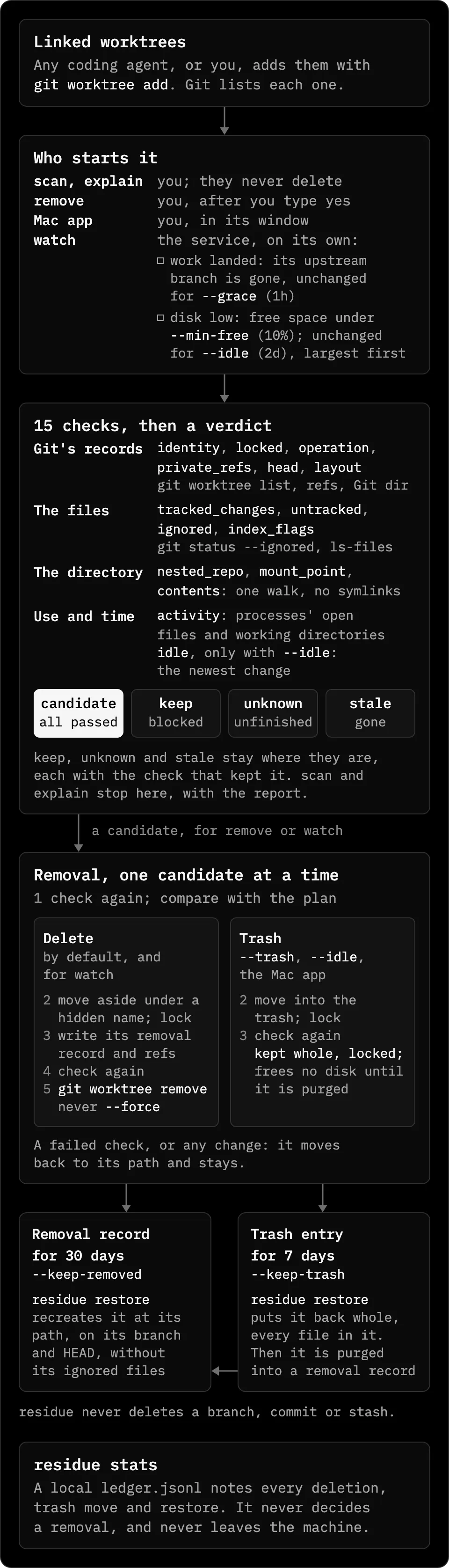
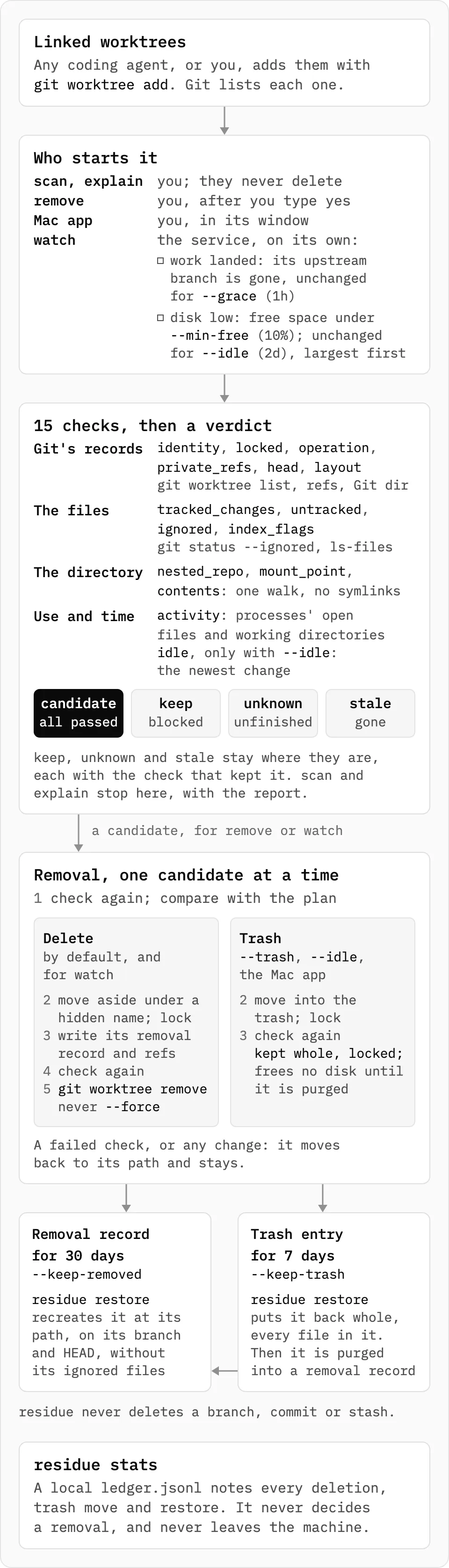
scan, explain, remove, the Mac app and watch all run the same checks. scan and explain stop at the report and never delete.
residue-cli is about 22,500 lines of Rust with one dependency, libc. It asks Git for everything Git knows, runs Git’s own commands to move and delete, and asks the operating system which processes are where.
A scan starts from a folder. A path inside a repository selects that repository, and any other folder is searched four levels down, without following symbolic links, crossing filesystems, or entering hidden directories, node_modules, target or Library.
It never decides on its own that a directory is a worktree. The list comes from Git, so a folder that only looks like one is never touched, and the main checkout is never a candidate.
Each check passes, blocks, or is unknown. Every check passing makes a candidate. One block makes keep, and a check that couldn’t finish, with none blocking, makes unknown, which keeps the worktree too.
The fourth verdict, stale, is a worktree Git still lists whose directory is gone. residue reports it and names git worktree repair for one you moved, but no command that clears Git’s record, since that would drop its HEAD and reflog.
Age is never a verdict on its own. A last change residue can’t read is unknown, not inactive.
Here’s what each of the 15 checks keeps a worktree for, in the chart’s order: Git’s records, the files, the directory, then use and time.
| Check | Keeps the worktree when |
|---|---|
identity | the path isn’t the linked worktree Git lists for this repository |
locked | it’s locked with git worktree lock |
operation | a rebase, merge, cherry-pick, revert or bisect is in progress |
private_refs | it has per-worktree refs under refs/worktree/, refs/bisect/ or refs/rewritten/ |
head | HEAD is detached and no branch, tag or remote-tracking ref contains it |
layout | it has submodules or is a sparse checkout |
tracked_changes | a tracked file is staged or modified |
untracked | any untracked file or directory exists |
ignored | an ignored entry matches no regenerable rule |
index_flags | a tracked file is marked assume-unchanged or skip-worktree, so git status can’t see edits to it |
nested_repo | it holds a .git entry other than its own: another repository, or files Git doesn’t list |
mount_point | it contains a mount point |
contents | residue couldn’t read some entries, or one changed while it read them |
activity | a process has its working directory or an open file inside it |
idle | only with --idle: it changed within that duration |
residue explain prints every check for one worktree. Here it is on the worktree I wrote the first version of this section in, right after I downloaded the two charts into it, with the paths shortened:
$ residue explain ~/Work/trevorlasn.com-wt/hoodresidue 0.0.11 · as of 15:45:18 +02:00 · activity: lsof inspected 493 of 758 running processes
worktree ~/Work/trevorlasn.com-wt/hoodrepository ~/Work/trevorlasn.comHEAD 75543bc401d6 on branch post-residue-hoodverdict keep: 1 check blocks removal.
checks pass identity the directory is the linked worktree Git lists for this repository pass locked not locked pass activity no process observed using it (lsof inspected 493 of 758 running processes; processes it cannot see are not checked) pass tracked_changes no staged or modified tracked files block untracked 4 untracked entries: .../how-it-works-dark.png, .../how-it-works.png, .../ui-how-it-works-dark.png, .../ui-how-it-works.png pass ignored no ignored files pass index_flags no tracked file is marked assume-unchanged or skip-worktree pass operation no rebase, merge, cherry-pick, revert or bisect in progress pass private_refs no worktree-private refs pass head on branch post-residue-hood; removal keeps the branch and its commits pass layout no submodules and not a sparse checkout pass contents every entry is readable; no nested repository or mount point
facts (never block) local-only commits 0 (as of the last fetch) upstream origin/master last change 2026-11-09 15:44 +02:00 (just now; .../ui-how-it-works-dark.png in the worktree) size 11.9 MB allocated, 11.1 MB apparent, about 11.9 MB reclaimable reclaimable leaves out hard links from outside; clones are not detectedFour images I hadn’t committed yet were enough to keep it. An agent’s half-finished work looks the same to residue.
The contents line also reports the nested_repo and mount_point checks, and idle runs only with --idle. That’s all 15.
The ignored check is the strictest, because git worktree remove deletes ignored files without asking. Ignored doesn’t mean disposable: .env files, .vercel/ project links, local databases and scratch notes are usually ignored too.
So a worktree stays unless every ignored entry matches a regenerable rule. The 32 built-in rules name what a tool recreates, such as node_modules, .next, dist, target, DerivedData, .venv and __pycache__.
Add your own for one repository in its Git config, which every worktree of that repository shares:
git config --add residue.regenerable web/.tscachegit config --add residue.regenerable '.local-dev/*.lock'A rule without a slash matches a name at any depth, so cache matches web/cache/ but not web/cache2/. A rule with a slash is a path from the worktree root, and * matches within one segment.
For every repository on the machine, put one rule per line in ~/.config/residue/regenerable. For one run, pass --regenerable RULE.
residue never reads a rule from a file committed to the repository. A repository you clone must not be able to declare your files disposable, and git clone never copies Git config.
It also ignores rules set through the environment, like git -c residue.regenerable=.... Every child process inherits the environment, so a rule there would widen what residue deletes for all of them, and residue prints a note on stderr instead.
Git reports a fully ignored directory once, and residue judges it as that one entry. When a path rule reaches inside it, residue reads the directory and calls it regenerable only if a rule matches every file, and a directory with more than 100,000 entries isn’t judged file by file, so it stays.
Three checks come from one walk of every entry in the worktree: nested_repo, mount_point and contents. residue opens each folder from the one above it and never through a symbolic link, so a folder swapped for a link mid-walk makes contents unknown.
The sizes come from the same walk, so there’s no option to skip it. The README measures it: on a 1.0 GB worktree with 46,572 entries, residue explain took 0.65 to 0.83 seconds on an Apple silicon Mac with a warm cache, and git worktree remove of an identical copy took 2.7 to 3.0 seconds.
Size counts each hard-linked file once and leaves out files that also have links outside the worktree, such as pnpm’s store. It can’t see APFS or Btrfs clones and snapshots, so the space actually freed can be smaller.
activity is one snapshot of the processes your user can inspect. On macOS it’s a single lsof run, and the header says what it covered, like lsof inspected 493 of 758 running processes. lsof runs in /, so it never counts itself as using the worktree you run residue from.
On Linux it reads /proc/*/cwd, exe, fd and maps. The maps file matters: a native module loaded from a worktree’s node_modules by a process started elsewhere holds no open file there, only a memory mapping.
FreeBSD uses procstat -f from the base system, because a packaged lsof there listed processes without resolving their working directories. On NetBSD, OpenBSD and DragonFly the probe can’t read open files, so it can never show a worktree is unused, and residue removes nothing there.
The probe answers in_use, not_observed or unknown. Here’s residue explain --json on one of my candidates, cut to those fields:
$ residue explain --json ~/Work/residue-wt/readme | jq '.worktree | {verdict, activity, last_change}'{ "verdict": "candidate", "activity": { "state": "not_observed", "processes": [], "reason": null, "detail": null }, "last_change": { "unix": 1794231426, "at": "2026-11-09T13:37:06Z", "source": "git_dir", "what": "index" }}not_observed isn’t proof that nobody needs the worktree. The probe can’t see another user’s processes, ones in a container or virtual machine, ones on another machine sharing the disk, or a session you closed and mean to resume.
That last gap is why an unattended sweep needs --idle. Agent harnesses often reset the shell to the main checkout between commands, so a paused agent has no process in its worktree at all.
The last change is the newest of the worktree’s own entries, the files directly in its Git directory, and the timestamp inside the newest HEAD reflog entry. Reads such as git status, git diff and git log don’t count, and remove --all --yes refuses to run without --idle.
In the JSON above, "source": "git_dir" with "what": "index" means the worktree’s index changed last. To keep a session you mean to resume, lock it, since residue treats every lock as final:
git worktree lock --reason "agent paused, resume Monday" PATHUnpushed commits don’t block. Removing a worktree keeps its branch and every commit on it, so explain lists them under facts instead, along with whether the upstream is gone, the last change and the size.
scan and explain never fetch. Local-only means local-only as of your last fetch.
A candidate still isn’t deleted the moment it passes. remove prints a plan and asks you to type yes, and the plan records what you were shown: HEAD, the branch, the lock, the changed and untracked files, every ignored entry with its file count, size and newest change, and when the index and HEAD reflog last changed.
Right before each removal it takes a new process snapshot, runs every check again, and compares the result with the plan. Any difference skips that worktree, so what gets deleted is what you saw, or nothing. The README shows what a skip looks like:
skipped .worktrees/big: node_modules/ changed since you confirmed (1,204 -> 1,388 files)Then it moves the worktree aside with git worktree move, to a hidden sibling named .NAME.residue-removing-PID, and locks it. That’s one rename on the same filesystem, and a worktree that is a mount point is skipped, never copied.
After the move nothing can reach the worktree by its old path, so residue writes the removal record and looks once more at the new path. A fresh process snapshot must see nobody inside, the record must still match, no Git operation may have started, and there must be no private refs, no .git but its own, no mount point and nothing it can’t read.
Only then does git worktree remove delete it, without --force. Git checks again for modified and untracked files before it deletes, but not for ignored ones, which is why residue’s own ignored check has to be strict.
If anything changed, residue moves the worktree back, unlocks it, and the reason ends with it is back in place. With --trash, --idle or the Mac app, the move goes into the repository’s trash instead, and the worktree stays there whole.
The move narrows the race but doesn’t close it. From the last check until Git finishes, a process that opens the hidden directory by its new name, or one the probe can’t see, can still write there, and that write is deleted with the worktree.
residue writes the record and syncs it to disk after the move and before the last check, and writes its refs in one git update-ref transaction, all or none. If the record can’t be written, it moves the worktree back and deletes nothing.
The run holds the record with flock(2) until its git worktree remove exits, and that Git holds it too, even if residue is killed. residue restore won’t take a record anyone holds, because moving a worktree back while Git is still deleting would let Git delete it where it lands.
If git worktree remove itself fails, residue drops the record only when nothing of the worktree is gone. Otherwise the worktree stays under its hidden name, and the reason ends with the residue restore command for its record.
If residue is killed between the move and the end of the delete, Git still lists the worktree under its hidden name. The next residue scan shows it under interrupted removals, with the one command that puts it back.
That command starts with test ! -e on the original path, because git worktree move into an existing directory would put the worktree inside it. residue never removes a worktree under a hidden name, so nothing touches it until you recover it.
The removal record is a directory in .git/residue-removed/, such as fix-login-20261107T040000Z/. Its info file holds the original path, branch, HEAD, upstream, why and by which command it was removed, when, how long it’s kept, its size, and the ignored entries the delete took.
Beside it are copies of the worktree’s HEAD reflog and config.worktree. A ref, refs/residue/removed/fix-login-20261107T040000Z, holds the HEAD commit, so a deleted branch, an expired reflog or git gc can’t lose it.
Commits that only the worktree’s own HEAD reflog knew, such as work on a detached HEAD or the commit before an amend, get refs under refs/residue/reflog/. git worktree remove deletes that reflog, and without the refs git gc would drop them. A record is usually a few kilobytes.
residue restore lists the records and the trash, newest first. Given a name, it recreates the worktree with git worktree add, never --force:
residue restoreresidue restore fix-loginresidue restore --to ~/src/app/.worktrees/fix-login-2 fix-loginIt never moves an existing branch. What it does depends on where the branch is now:
| The branch now | residue restore |
|---|---|
| at the recorded HEAD, or ahead of it | checks the branch out |
| rewritten, so it no longer contains the recorded HEAD | creates BRANCH-restored at the recorded HEAD |
| deleted | creates it again at the recorded HEAD |
| checked out in another worktree | creates BRANCH-restored and names that worktree |
| none, because the worktree was on a detached HEAD | restores it detached at the recorded HEAD |
It refuses when something exists at the path, and --to restores somewhere else. The new worktree gets its saved HEAD reflog back, but not the ignored files the delete took: restore lists them, and your install or build makes them again.
watch never removes a restored worktree again because its branch landed, since you wanted it back after it landed. Low disk can still remove it.
Each record keeps the --keep-removed it was written with, 30 days by default, and no later run forgets it sooner. Forgetting deletes the record and its refs in one transaction.
That grace period matters for a branch deleted after a squash merge. The record is then the last thing holding those commits, so restore what you want before it expires, or put it on a branch. Tools that read every ref, like git log --all and git push --mirror, also see refs/residue/.
The trash is .git/residue-trash/, one directory per entry with the worktree and an info record. Moving there is one rename on the repository’s filesystem, git status never shows it, and deleting the repository deletes its trash.
A trashed worktree stays registered with Git and locked with the reason residue: in trash. Its branch stays checked out there, so git switch to that branch elsewhere refuses until you restore it or the purge removes it.
residue refuses to trash a worktree on another filesystem than its repository, because the move would be a copy. The trash frees no disk until a purge: every remove run purges entries older than --keep-trash, 7 days by default, after running every check on them again except --idle.
watch doesn’t delete anything itself. For a landed branch it starts residue remove --yes --idle --no-trash --only-if-upstream-gone, which reads the upstream at the plan, before the move aside, and after it.
The worktree stays if the upstream is back, if there’s no upstream, if HEAD is detached, if the upstream is local, or if the ref doesn’t resolve to a commit. For low disk, the child runs without --only-if-upstream-gone and removes until free space is five points above the threshold.
The fetch is git fetch --prune --no-tags for each remote a worktree’s branch tracks. It never prompts: SSH runs with BatchMode=yes unless you set your own SSH command, so a fetch that needs a password fails, is logged, and changes nothing.
A fetch changes only remote-tracking refs and writes no FETCH_HEAD, so it doesn’t reset a worktree’s idle clock. It’s never a reason to remove; it only refreshes the refs the checks read.
On macOS, watch waits on kqueue events instead of polling, and it still reads free space every five minutes and rescans every six hours. It scans only after the refs have been quiet for 20 seconds, at most two minutes, so a git remote rename in progress doesn’t look like deleted branches.
Here’s a dry run on my Mac with fetching off. Nothing qualified, so that’s all it printed:
$ residue watch --once --dry-run --no-fetch ~/Work2026-11-09T13:53:06Z residue watch: watching ~/Work (kqueue) · removes: landed and unchanged 1h, or below 10% free and unchanged 2d · removal records: 30d · fetch: off (--no-fetch) · dry run: removes nothing · residue 0.0.11Every deletion, purge, trash move and restore adds a line to a local ledger, ~/Library/Application Support/residue/ledger.jsonl on macOS, which residue stats reads. The ledger never decides a removal and never leaves the machine, and one it can’t write is a warning, not a failure.
residue only handles linked worktrees. For pnpm’s store, Docker’s build cache or toolchain caches, use their own commands, like pnpm store prune, docker builder prune or go clean -cache.
It runs on macOS, Linux, the BSDs and illumos, and not on Windows. It isn’t a security boundary either: it runs as you and assumes your other processes aren’t trying to fool it.
If you only want the worktrees Claude Code created, Claude Code sweeps its own. Worktrunk creates, switches, merges and removes worktrees. residue only removes, whichever tool made them, and only when every check passes.
residue-ui, the same checks in a Mac app
residue-ui is residue in a window. Every check, size and removal in it comes from the residue binary inside the app, so it can’t disagree with your terminal.
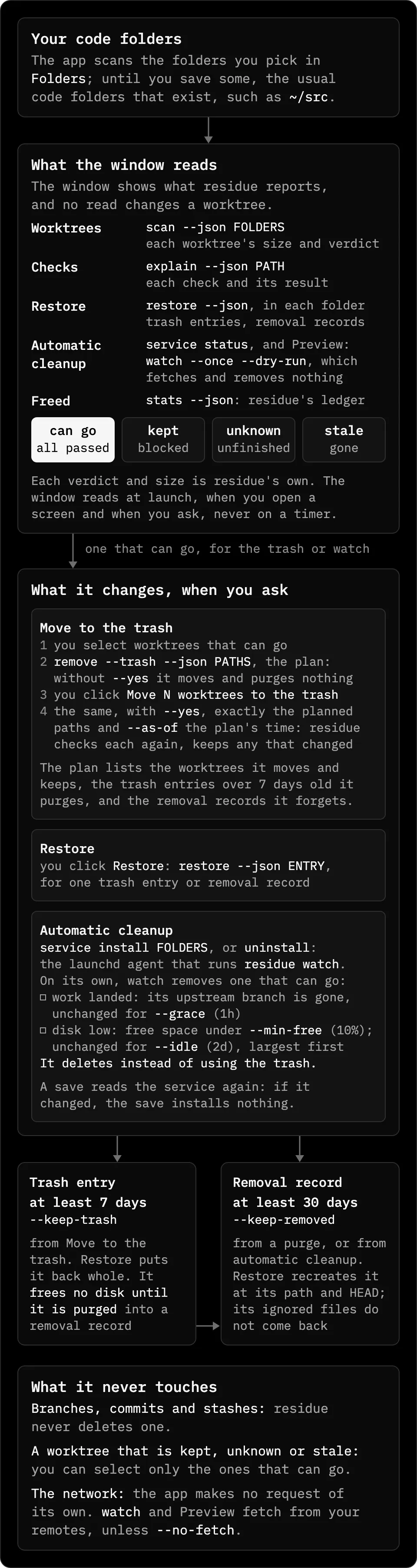
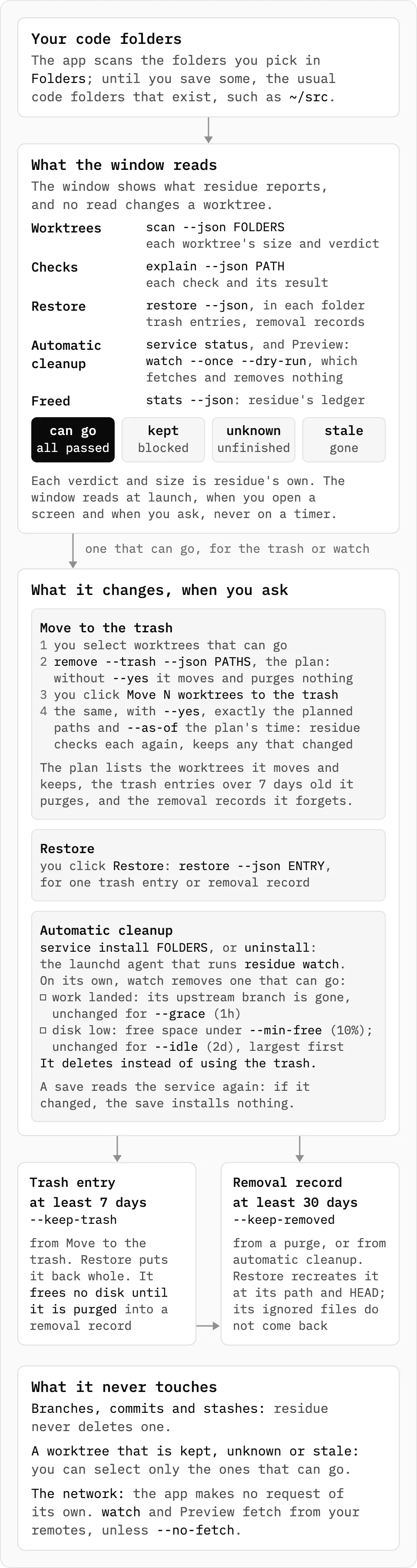
The window only reads until you ask it to change something. Worktrees runs scan --json, a worktree’s checks come from explain --json, Restore from restore --json and Freed from stats --json.
It reads at launch, when you open a screen and when you ask, never on a timer. The app makes no network request of its own; only watch and its Preview fetch from your Git remotes.
The Worktrees screen sizes each worktree by the space removing it frees. White can go, gray is kept, and hatched is unknown:
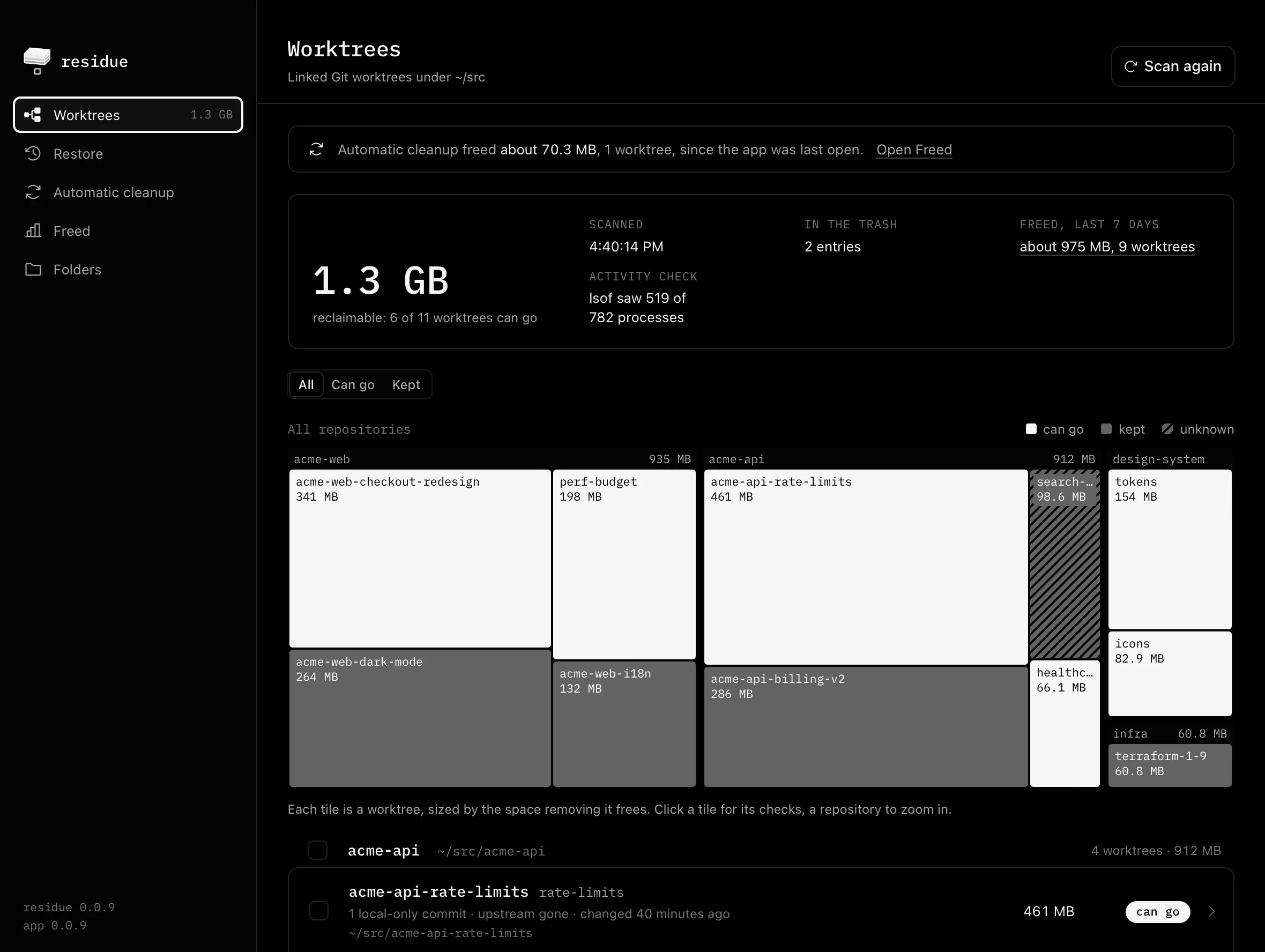
You can select only the worktrees that can go. Move to the trash then runs residue twice: first without --yes, which plans and moves nothing, then, after you click, with --yes on exactly the planned paths.
That second run checks each worktree again and keeps any that changed. It also passes the plan’s time as --as-of, so it purges only the trash entries that had expired when you saw the plan.
Restore lists what residue can bring back, newest first. A trash entry comes back whole for at least 7 days, but it keeps its disk space until it’s purged into a removal record:

Freed reads residue’s own ledger: what it freed on this machine in the last 7 and 30 days, all time, by command and by repository.
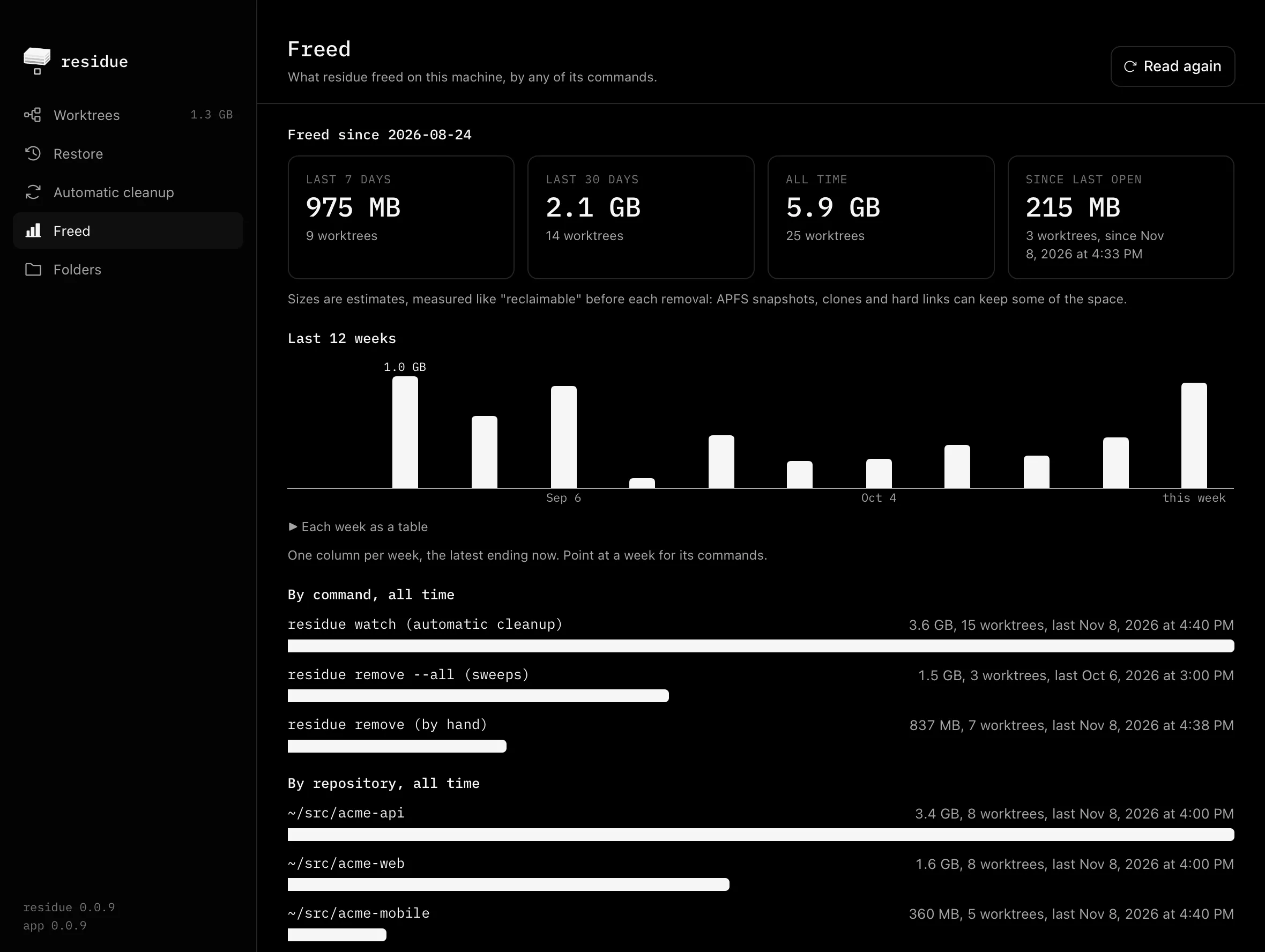
These screenshots use example repositories and a made-up history of removals.
Automatic cleanup in the app is the same service as residue service install, so turning it on in one shows up in the other. It deletes instead of using the trash, and the app says so before you turn it on.
To install it, download the disk image and drag residue to Applications:
curl -fLO https://github.com/whiteheap/residue-ui/releases/latest/download/residue-macos.dmgopen residue-macos.dmgIt needs macOS 13 or later, on Apple silicon or Intel, and residue comes inside it. It isn’t notarized yet, so macOS blocks the first launch. The README has the three steps to open it.
Use the app when you want to see what’s taking space and click. Use the CLI on Linux, in a script, or as an agent’s last step, when the session that owns a worktree knows its task is done:
residue remove --yes --json "$WORKTREE"Run it from outside the worktree. Exit 0 means the worktree is gone, and exit 3 means it’s still there.
Each path gets one result, removed, trashed, refused, skipped, failed, invalid or not_attempted, with a reason that names the check by its stable id. Every check still runs with --yes; it only skips the prompt.
Both are MIT-licensed: residue-cli and residue-ui. The site is residue.whiteheap.com.
