---
title: "Why Browsers Block CSS File Modifications"
description: "Understanding CSS Object Model (CSSOM), browser security and practical alternatives for dynamic styling"
canonical: "https://www.trevorlasn.com/blog/why-browsers-block-css-file-modifications"
author: "Trevor I. Lasn"
published: "2024-10-25"
last-updated: "2024-10-25"
topics: ["CSS"]
outdated: true
---
# Why Browsers Block CSS File Modifications
Understanding CSS Object Model (CSSOM), browser security and practical alternatives for dynamic styling
By Trevor I. Lasn · Published 2024-10-25 · Updated 2024-10-25 · https://www.trevorlasn.com/blog/why-browsers-block-css-file-modifications
> This article is outdated. The tools or APIs discussed here have changed significantly since this was written. The article is preserved for reference, but the code examples may no longer work as shown.
The browser treats your CSS files like sealed documents - JavaScript can see them but can't edit them. This isn't a bug, it's a crucial security feature. Think of your browser as a secure reading room. You can read documents (CSS files), but you can't take them home or modify them. This prevents:
- Malicious scripts from permanently changing your site
- Cross-site scripting attacks from persisting
- One website affecting another's styles
- Client-side changes affecting all users
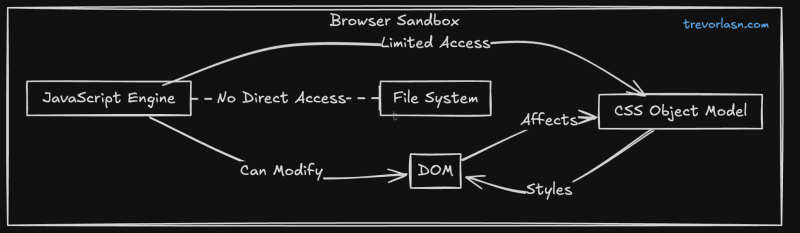
JavaScript can't directly modify CSS files because browsers enforce strict file system access restrictions. This is part of the browser's security model, but it's more nuanced than a simple "can't edit" rule. The actual reasons are:
- **File System Restrictions:** Browsers don't allow direct file system access from client-side JavaScript
- **Same-Origin Policy:** Even for files on the same domain, direct file modification would violate the web's security model
- **Resource Immutability:** Downloaded resources (like CSS files) are treated as immutable in the browser
### Understanding the CSSOM
[The CSS Object Model (CSSOM) is JavaScript's interface to CSS.](https://www.trevorlasn.com/blog/css-object-model-cssom) It's like the DOM, but for styles:
```javascript
// Accessing the CSSOM
const sheets = document.styleSheets;
const firstSheet = sheets[0];
const rules = firstSheet.cssRules;
// Reading rules
for (const rule of rules) {
console.log(rule.selectorText, rule.style.cssText);
}
// Modifying the CSSOM (not the file)
firstSheet.insertRule('p { color: blue }', rules.length);
```
### What's Not Possible
```javascript
// ❌ Can't directly modify a CSS file
const cssFile = '/styles.css';
fetch(cssFile)
.then(css => {
css.addRule('.new-class { color: red }'); // SecurityError
css.save(); // Not possible
});
// ❌ Can't access external stylesheets from different origins
const externalSheet = document.styleSheets[0];
try {
const rules = externalSheet.cssRules; // SecurityError if from different origin
} catch(e) {
console.log('Security error:', e);
}
// ❌ Can't modify the file system
const style = document.createElement('style');
style.writeFile('/new-styles.css', '.class {}'); // Not possible
// ❌ Can't persist changes to the original CSS file
document.styleSheets[0].persistChanges(); // Not possible
```
### What Is Possible
```javascript
// ✅ Create and modify stylesheet rules in memory
const sheet = document.styleSheets[0];
try {
sheet.insertRule('.my-class { color: red }', 0);
sheet.deleteRule(0);
} catch(e) {
console.log('Only works for same-origin stylesheets');
}
// ✅ Create new stylesheets
const newSheet = new CSSStyleSheet();
newSheet.replaceSync(`
.dynamic-class {
color: blue;
}
`);
document.adoptedStyleSheets = [newSheet];
// ✅ Modify inline styles
element.style.color = 'red';
// ✅ Add/remove classes
element.classList.add('active');
element.classList.remove('inactive');
```
### Why It Works This Way
The restriction on modifying CSS files isn't primarily about preventing malicious changes (since JavaScript can still modify styles in memory). Instead, it's part of a broader security model that:
1. Maintains clear separation between client and server resources
2. Prevents client-side code from making permanent changes to server files
3. Ensures predictable resource loading and caching behavior
The browser's security model is about containment, not just protection. Each webpage runs in its own sandbox where it can modify its own state but can't affect:
* The underlying file system
* Other websites
* The browser itself
* Persisted resources
This creates a reliable and predictable environment for web applications to run safely.
### Understanding JavaScript Environments
JavaScript isn't limited to browsers. Each environment offers different capabilities for handling CSS:
- Client-side JavaScript (running in the browser) cannot modify CSS files due to browser sandbox restrictions
- Server-side JavaScript (like Node.js) CAN modify CSS files because it has file system access
Here's a quick Node.js example to prove it:
```javascript
// This works perfectly fine in Node.js
const fs = require('node:fs');
fs.appendFileSync('styles.css', `
.new-class {
color: red;
}
`);
```
Browser JavaScript is sandboxed for security, but server-side JavaScript has full system access. Think of it like this:
- **Browser:** Can only modify styles in memory (CSSOM)
- **Server:** Can read, write, and modify CSS files directly
This difference exists because:
1. Browsers need to protect users from malicious scripts
2. Servers are controlled environments where file access is expected
3. Server-side code runs in a trusted context
When someone says "JavaScript can't modify CSS files," they usually mean browser JavaScript. The language itself has no such limitation.
### The Bigger Picture: Beyond CSS
The browser's security model isn't about CSS or JavaScript - it's about keeping websites from messing with your local files. This is why:
- Websites can't modify their source files
- Downloads need user permission
- File system access requires explicit APIs and permissions
This is a fundamental browser security restriction. When you load a website, all its resources are read-only. You can read them and make copies in memory, but you can't modify the originals.