---
title: "Optimize Your Astro Site's with astro-capo"
description: "astro-capo sorts your Astro site's head elements into 11 weighted groups so critical tags like charset come first. How to install it and use it in a layout."
canonical: "https://www.trevorlasn.com/blog/astro-capo"
author: "Trevor I. Lasn"
published: "2024-10-19"
last-updated: "2025-05-03"
topics: ["Web performance"]
---
# Optimize Your Astro Site's with astro-capo
astro-capo sorts your Astro site's head elements into 11 weighted groups so critical tags like charset come first. How to install it and use it in a layout.
By Trevor I. Lasn · Published 2024-10-19 · Updated 2025-05-03 · https://www.trevorlasn.com/blog/astro-capo
[astro-capo](https://github.com/natemoo-re/astro-capo) categorizes your `` elements into 11 groups, each with a specific weight.
It then sorts these elements based on their weight, ensuring that the most critical ones (like charset declarations) appear first.
Within each group, it preserves the original order of elements.
The result? A perfectly organized `` that helps your site render faster and more efficiently. Using astro-capo is simpler than trying to remember the optimal order yourself.
This website you're reading right now uses astro-capo. Install the official Capo [browser extension](https://chromewebstore.google.com/detail/capo-get-your-%EF%B9%A4%F0%9D%9A%91%F0%9D%9A%8E%F0%9D%9A%8A%F0%9D%9A%8D%EF%B9%A5/ohabpnaccigjhkkebjofhpmebofgpbeb) from the Chrome Web Store. Once installed, click the extension icon on any page here. You'll see firsthand how astro-capo optimizes my `` elements. It's a great way to visualize the impact of proper `` organization.

First, install the package:
```bash
npm install astro-capo
```
Then, in your Astro layout or page, import and use the `Head` component:
```astro
---
import { Head } from 'astro-capo'
---
My Awesome Astro Site
```
That's it! `astro-capo` will take care of the rest, ensuring your `` elements are in the optimal order for performance.
So, what exactly is `astro-capo` doing? Here's a breakdown of the 11 groups it uses to categorize your `` elements:
1. **Pragma Directives (Weight: 11):** These are the highest priority. Things like `` and `` go here. They tell the browser how to interpret your document.
2. **Title (Weight: 10):** Your `` tag. It's high up because it's essential for SEO and user experience.
3. **Preconnect Hints (Weight: 9):** `<link rel="preconnect">` tags. These establish early connections to important third-party origins.
4. **Asynchronous Scripts (Weight: 8):** Scripts with the async attribute. They load in parallel with other resources.
5. **Import Styles (Weight: 7):** Any `@import` statements in your CSS.
6. **Synchronous Scripts (Weight: 6):** Regular `<script>` tags without async or defer.
7. **Synchronous Styles (Weight: 5):** Your `<link rel="stylesheet">` and `<style>` tags.
8. **Preload Hints (Weight: 4):** `<link rel="preload">` and `<link rel="modulepreload">` tags.
9. **Deferred Scripts (Weight: 3):** Scripts with the defer attribute.
10. **Prefetch and Prerender Hints (Weight: 2):** `<link rel="prefetch">, <link rel="dns-prefetch">`, and `<link rel="prerender">` tags.
11. **Everything Else (Weight: 1):** Any other elements in your `<head>`.
Here's a visual representation of how `astro-capo` organizes your `<head>`:
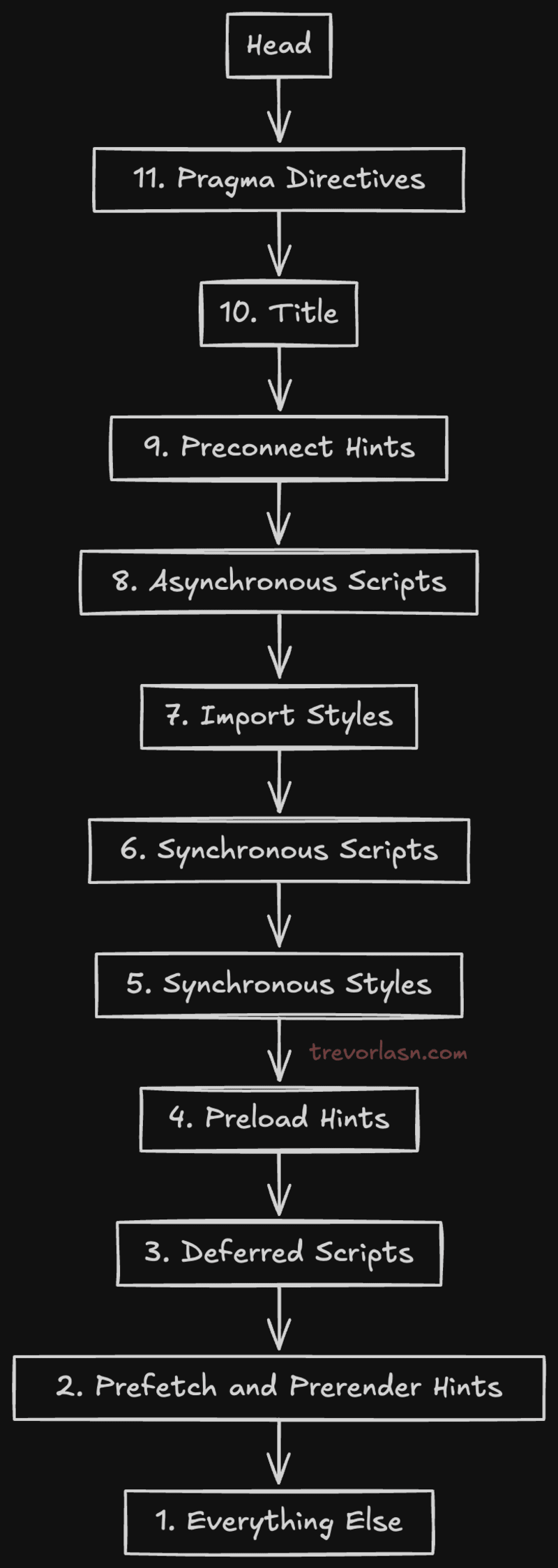
<blockquote>Elements are categorized into 11 groups. Each group has an associated weight to determine the optimal sort order. Elements within the same group are considered equal weight and displayed in the order they’re found in the document. --[The rules of capo.js](https://rviscomi.github.io/capo.js/user/rules/)</blockquote>
Is all this fuss really worth it? It absolutely can be.
1. **Faster Rendering:** By prioritizing critical resources, your browser can start rendering the page sooner.
2. **Improved SEO:** Search engines love fast-loading pages. A well-organized `<head>` can contribute to better search rankings.
3. **Better User Experience:** Faster load times mean happier users, especially on mobile devices.
4. **Reduced Cognitive Load:** With astro-capo handling the optimization, you can focus on building great content instead of worrying about `<head>` element order.
While `astro-capo` is a great tool, it's not always necessary. If you're building a small, simple site with just a few elements in the `<head>`, manually organizing them might be just as effective. `astro-capo` shines in more complex projects where keeping track of numerous `<head>` elements becomes challenging.
So go ahead, give `astro-capo` a try in your next Astro project. Your `<head>` (and your users) will thank you.